
macOS 12.3+ • Apple Silicon • Bot-Free

Microsoft Teams Name Alert & Local AI Transcription for macOS

Corporate Microsoft Teams environments block third-party meeting bots and restrict external cloud apps. PingMeBud runs completely locally on your Mac to monitor Teams audio and alert you when you're actually needed.

No credit card required • Signed & notarized by Apple • 100% local Whisper AI

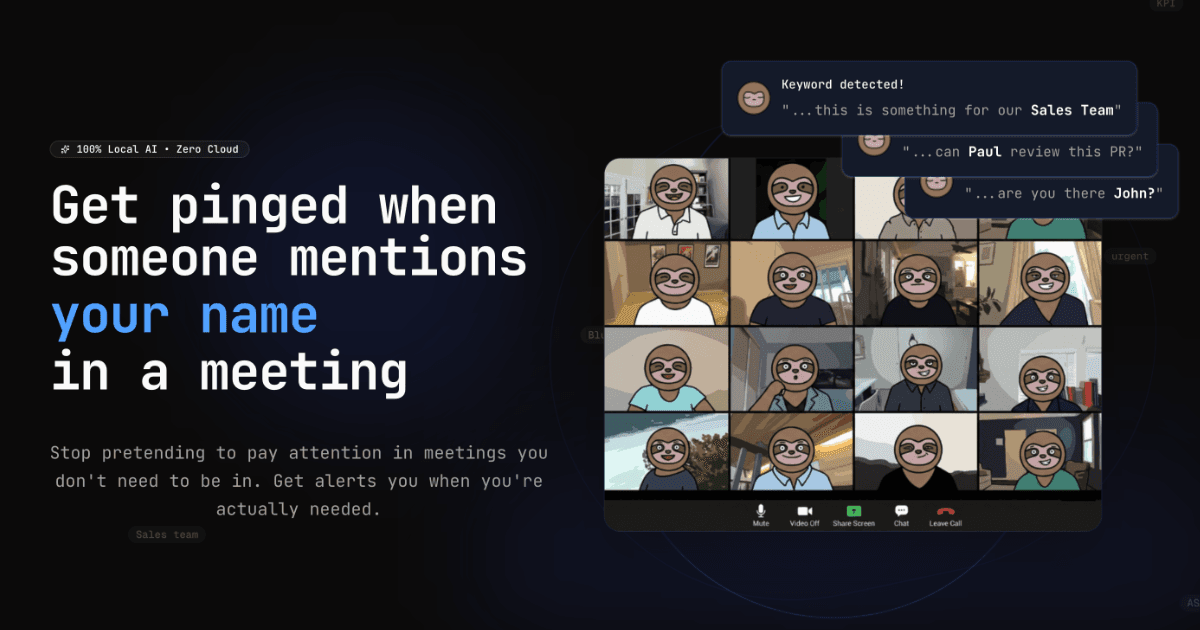
PingMeBud macOS keyword alert during a Microsoft Teams meeting

How PingMeBud works with Microsoft Teams

Start monitoring your Microsoft Teams calls locally in under a minute—zero plugins or bots required.

1

Configure your keywords once

Add your name, team name, stakeholder names, or phrases like "are you there" and wildcards like "deploy*" directly inside PingMeBud.

2

Run Teams in the Mac app or browser

PingMeBud works with both the native Microsoft Teams desktop app and Teams in Chrome, Edge, or Safari because it listens to macOS system audio.

3

Catch every Teams ping without splitting focus

Keep working on code or docs during long Teams status calls. A macOS notification and optional red screen border bring you back the moment your name comes up.

Built for Microsoft Teams multitaskers

Bypasses Teams tenant bot restrictions

Many enterprises disable external meeting bots and Teams app integrations. Because PingMeBud does not touch Microsoft Graph or join the call, there is nothing to block.

Apple notarized & compliance-friendly

Signed and notarized by Apple with zero cloud servers, zero accounts, and RAM-only storage—no company audio ever leaves your machine.

No microphone conflicts

PingMeBud only captures system audio output, never your mic input, so your Teams mute state and microphone settings stay untouched.

Silence detection for awkward pauses

Track silence as a keyword so you notice when a Microsoft Teams presenter finishes speaking or waits for your team to respond.

Privacy Comparison

Why not a Microsoft Teams meeting bot?

Enterprise IT policies routinely restrict cloud recording bots in Microsoft Teams due to data governance and compliance rules.

Cloud Teams Bots

  • Often blocked by Microsoft Teams admin and tenant policies
  • Visible in the Teams roster and triggers tenant audit logs
  • Streams internal company conversations to external SaaS servers
  • Requires corporate Microsoft 365 account sign-in and OAuth scopes

PingMeBud (100% Local on macOS)

  • Runs locally on your Mac with zero Microsoft 365 integration
  • Invisible to Teams participants and does not record to disk
  • Signed & notarized native macOS app—no MDM kernel extensions
  • Works offline for up to 7 days once Whisper models are downloaded

Microsoft Teams FAQ

Does PingMeBud require Microsoft Teams admin approval?
No. PingMeBud is not a Teams app or bot—it is a standalone, Apple-notarized macOS utility that listens passively to your Mac's system audio output.
Does it work with both the Teams desktop app and Teams on the web?
Yes. Because PingMeBud captures system-level audio on macOS, it monitors Microsoft Teams whether you join via the desktop client or any web browser.
Can other participants see PingMeBud in a Microsoft Teams call?
No. PingMeBud never joins the Teams meeting as a participant, never writes to Teams chat, and sends zero audio or telemetry over the network.
Can PingMeBud detect keywords in non-English Teams calls?
Yes. You can switch between English-only and multilingual Whisper models in settings to monitor Spanish, French, German, Portuguese, Japanese, and many other languages.

Using other meeting tools too?

PingMeBud monitors system audio across every Mac app at once.